

Cisco UCCX Configuration Guide with MRCP for ASR and TTS
March 26, 2026
Cisco UCCX MRCP Configuration Guide for ASR and TTS
Comstice offers, on-premises automatic speech recognition (ASR) and text-to-speech (TTS) features for your Cisco UCCX infrastructure. This document explins the details of the integration with Cisco UCCX IVR via MRCP for speech recognition and text to speech. Click here to learn more about the languages supported for ASR and TTS by Comstice.
TLDR
Comstice IVR can work with your existing Cisco UCCX IVR as an MRCP resource for ASR and TTS. It can also run as a standalone solution to replace Cisco UCCX IVR service. Comstice IVR solution runs on your network or your private cloud as a separate virtual server or as a Kubernetes pod. It integrates with Cisco UCCX 10.5 or higher. Comstice also offers AI Voice Assistant for AI Self Service Use Cases.
Comstice IVR Configuration
Comstice IVR solution runs on a LinuxVM as a docker container or Kubernetes Pod. It also supports Azure Cloud and Open Shift infrastructures.
Comstice IVR settings used for integration with Cisco UCCX is under /opt/server/dryrun/comstice-ivr/config/ivr/application.yaml file. Comstice engineer can help you to configure the parameters on this file before starting your container. Port numbers are also indicated on the server settings for firewall updates.
Cisco UCCX TTS Configuration
On the UCCX Appadmin pages, go to Subsystem > MRCP TTS > MRCP TTS Providers.
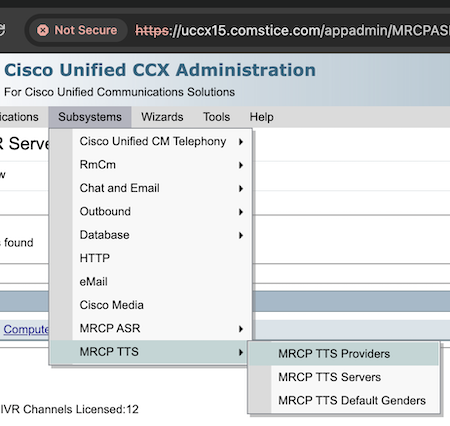
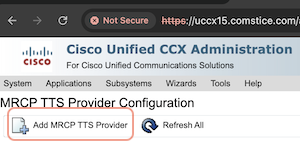
On the MRCP TTS Provider Configuration page, click on "Add MRCP TTS Provider".
Click Add next to Provider Name then enter Comstice TTS as your TTS provider.
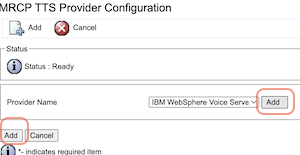
Click Add on the main page to save.
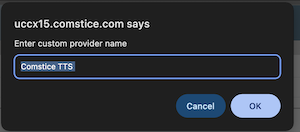
Adding Comstice TTS as your Cisco UCCX MRCP TTS Provider
- Add TTS Provider:On Cisco UCCX Administration page, go to Subsystems > MRCP TTS > MRCP TTS Providers. On MRCP Providers, add a new MRCP TTS Provider. Enter "Comstice TTS" as the name and save.
![]()
![]()
![]()
- Add TTS Server:From Subsystems > MRCP TTS > MRCP TTS Servers, click on Add a New MRCP TTS Server. Enter the IP address or hostname of your Comstice IVR, select Comstice TTS as the provider and enter the port number which is 8188 by default. Finally, select the language you have licensed. When the language is selected, you can also select the genders.
- High Availability:Add a second TTS Server for high availability. Select the same provider but set the IP address or the hostname of the secondary Comstice TTS server.
- Set TTS Default Gender:You can also set the default gender for the languages enabled on your Comstice TTS Server. From Subsystems > MRCP TTS > MRCP TTS Default Genders, select the default gender for each language selected.
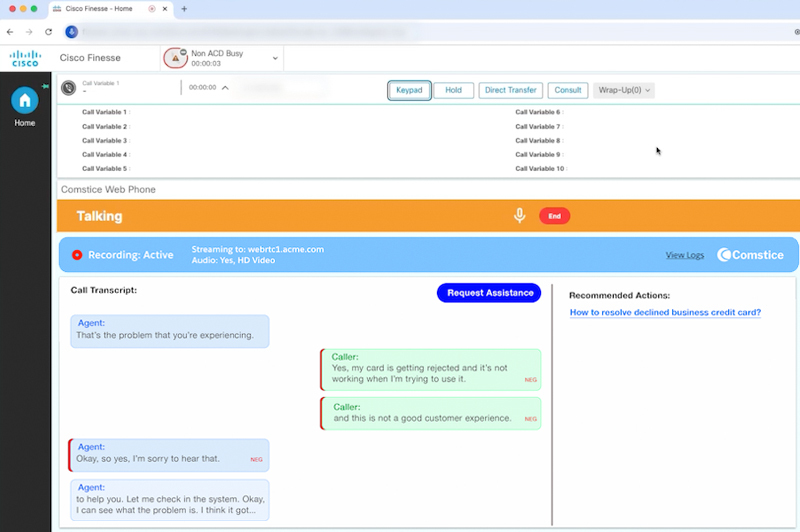
Adding Comstice ASR as your Cisco UCCX MRCP ASR Provider
- On the UCCX Administration > Subsystems> MRCP ASR > MRCP ASR Servers, click on Add New to add a new ASR Server.
- Set server IP address or the hostname as the server name, and the number of Comstice ASR Licenses you want to allocate from your license bundle. Also select OSR 3.1.x as your grammar variant.
- Click on Add button to save your new provider.
- On the UCCX Administration > Subsystems> MRCP ASR > MRCP ASR Servers, click on Add New to add a new ASR Server.
- On the UCCX Administration > Subsystems> MRCP ASR > MRCP ASR Servers, click on Add New to add a new ASR Server.
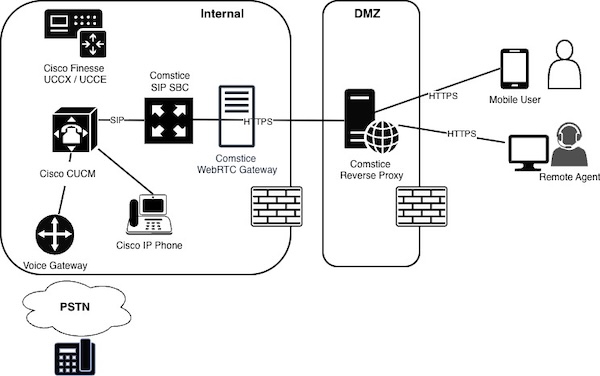
Deployment and Rollout: Comstice-Hosted and PoC
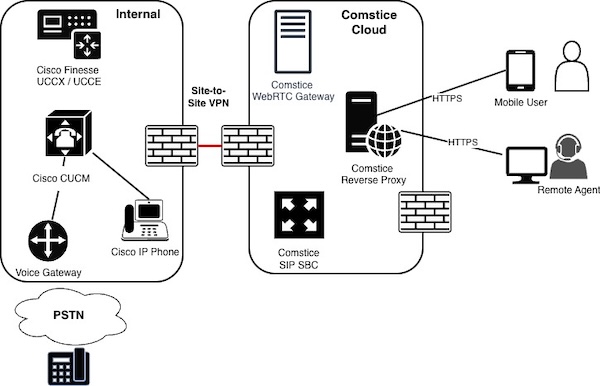
- Comstice can host solution elements and connect to your network using site-to-site VPN.
- In this case, main task is to establish site-to-site VPN and handle communications accordingly.
- Proof of concepts are also done through Comstice-Hosted environment.
Conclusion
Running a webphone with Cisco Finesse is a comprehensive task but at Comstice we help to make this straightforward and help your business to enjoy Finesse with better feature set than shared cloud solutions. Click here to learn more and request callback.