

Cisco Finesse Real-Time Call Transcripts
April 23, 2026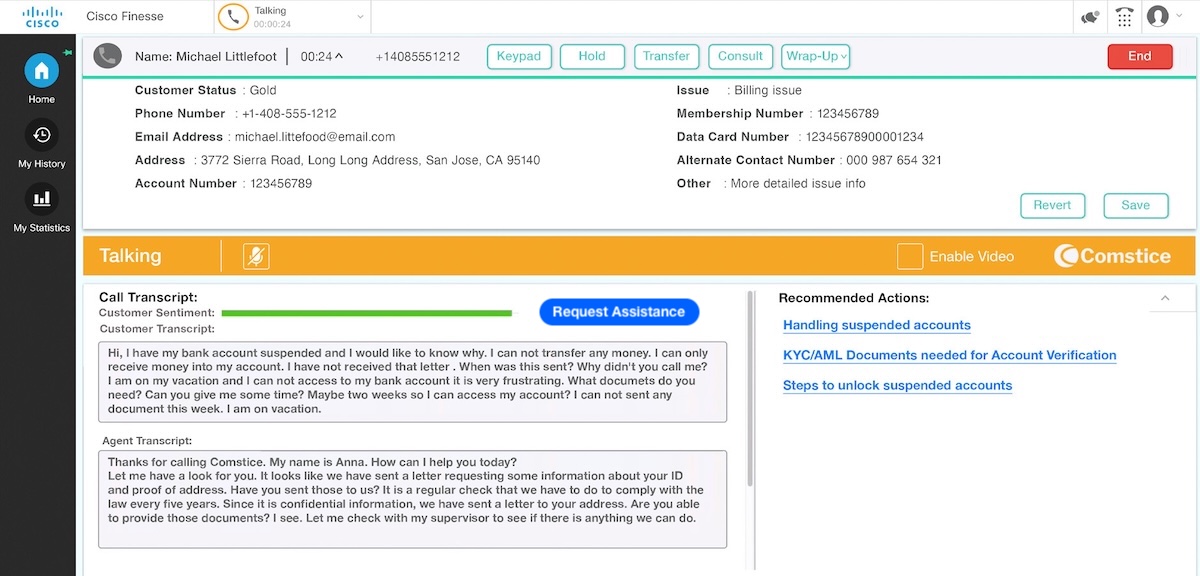
Real-Time Call Transcripts for Cisco Finesse
Comstice Call Recording offers real-time call transcripts for Cisco Finesse. This provides real-time sentiment analysis for the supervisors and real-time AI Agent Assist for the agents to get recommendations for the possible resolutions to the reported issue.
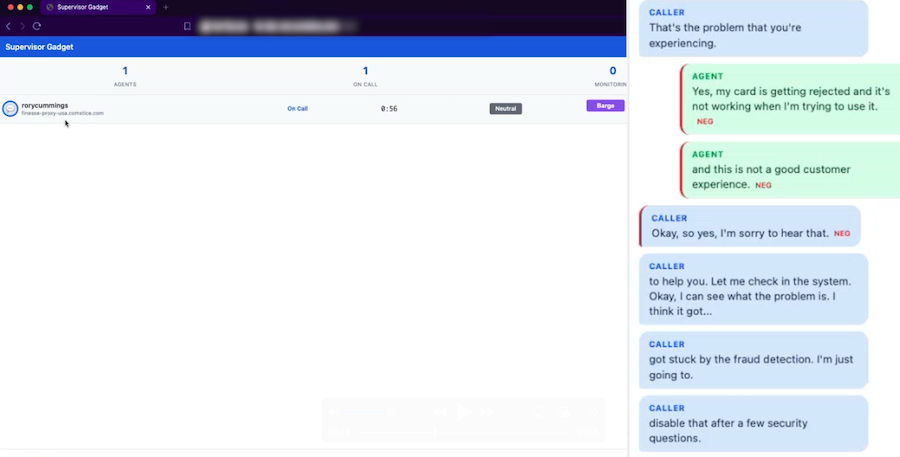
“ The goal is to eliminate any skill trainings and help agents to handle any contacts from any queue. Supervisors can also get alerted about any caller with negative sentiment so that they can silently monitor, barge in or intercept the call if needed.”
Problem
We tackle two issues here;
- Supervisors do not get any alerts about the calls that are not going well, unless agent escalates manually.
- Agents must be trained for each skill separately. Agents do not have the tools to handle calls from any skill.
Solution
Comstice Call Recording Real-Time Call Transcripts feature helps to handle both challenges;
- Real-Time Sentiment Monitoring Gadget for Cisco Finesse helps supervisors to get alerted about the calls with negative sentiment, silent monitor, barge in or intercept the call.
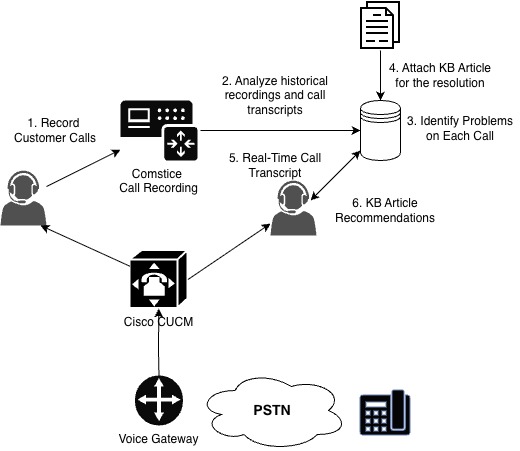
- Meanwhile, Comstice Call Recording analyzes old call transcripts of the recorded calls and identifies the reported issues.
- Customer service staff can create short knowledge base articles for the identified issues or link them to existing articles.
- When real-time call transcripts find another call with the same issue, they list the tagged articles on the agent's Finesse widget so that agent can follow the steps for the resolution, even when they are not fully trained about the skill.
- Comstice Call Recording will continue to analyze every call and will flag up any issue with no resolution article available.
How It Works
Comstice Call Recording integrates with Cisco CUCM exactly the same way as your legacy recording solutions. There are two processes running here;
- Creating real-time call transcript of each call with real-time sentiment analysis for the supervisors.
- Deep analysis of each recorded call old and new, creating transcripts and identifying the reported problem. these reported problems will be tagged into resolution articles. Once a similar call is received, agents will receive the list of the resolution articles for the same or similar question from the customer.
Legacy Call Recording vs Comstice Call Recording
- Comstice Call Recording is on-premises but legacy recording solutions will soon become cloud-only
- Comstice solutions run on LinuxOS and support Docker / Kubernetes infrastructure for an easy deployment and upgrades
- Many legacy call recording solutions are running on WindowsOS which requires frequent security updates and hardware upgrades
- Legacy call recording solutions do not offer extensive real-time transcript, knowledge base, real-time sentiment analysis features on your network
- Comstice Call Recording also supports SIPREC-based recording for Cisco Finesse Webphone Gadget, Cisco Finesse Mobile Softphone and Cisco Finesse CRM Webphone.
FAQs:
How easy to swap my old call recording with this one?
Configuration is the same as the legacy recording. Comstice provides the solution as an OVA/OVF file. Once it is deployed into your network, it can be integrated on a Webex session for remote access.
What happens if we move to the cloud? Will our investment be obsolete?
Many cloud contact center solutions do not offer this feature. This can be used as part of your service; Comstice can host the solution in the cloud and integrate it with your new cloud contact center.
Do we need GPUs (NVIDIA etc.)?
Usually, you do not need a GPU for this. Comstice handles this solution by using specialist small language models running on your network.
Can I run this on my private cloud?
Yes. All Comstice solutions support Docker, Kubernetes and OpenShift. You can run it on your own private cloud such as Azure Cloud.
Key Takeaways
- Analyzing call transcripts and bringing up the AI features provides great customer service.
- By eliminating skill-specific agent allocation, you can utilise your call center agent base much efficiently.
- Knowledge base articles can also be made publicly accessible so that the customers can check out those articles before making a contact.
Click here to learn more and request a callback.