


Best CT Suite Advanced Routing Replacement: Comstice CTI Router
Comstice Avaya CTI Router is a third-party call control application. It helps to influence call routing on Avaya contact centers by communicating with external applications and Avaya services. Click here to learn more about the benefits and the use cases of Comstice CTI Router.
Comstice Avaya CTI Router can be used as an alternative to CT Suite Advanced Router feature.
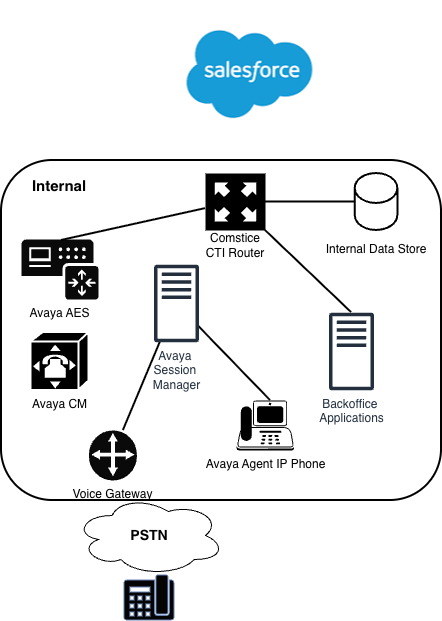
How It Works
In a typical Avaya Aura/Elite deployment, the call flow is as follows;
PSTN/SIP trunk → Communication Manager (VDN/Vector) → AES → Comstice CTI Router → AES → CM (target VDN/skill/agent)
Comstice CTI Router is a third-party call-control application. It doesn’t terminate media or own the dial plan — CM still owns those. AES is the CTI middleware. AES enables CTI applications to control and monitor telephony resources on Communication Manager, receiving requests from CTI applications and forwarding them to CM over the CSTA-based protocol.
How Comstice CTI Router Works
- A call hits a VDN on CM and runs its associated vector.
- The vector contains an adjunct routing link
step. This is the adjunct routing link process in CC Elite vector programming. - CM sends a CSTA RouteRequest event over the CTI link to AES, which forwards it via TSAPI to whichever client (Comstice CTI Router) has a route registration on that VDN. The request carries call data: ANI, DNIS, UCID, collected digits, UUI, VDN variables, and any data the vector has gathered through IVR steps.
- Comstice CTI Router evaluates the request against its workflow logic — typical inputs are CRM dips (last-agent lookup, customer tier, open case), time-of-day, business rules, real-time queue stats pulled via TSAPI monitors, language preferences, and any data passed in UUI/UCID. Comstice CTI Router automatically directs users to the customer service agent who is best equipped to answer their question, which is exactly what this decision engine does.
- Comstice CTI Router returns a RouteSelect message naming the destination — usually a target VDN, sometimes a specific skill, sometimes a direct agent extension — and can attach UUI for screen-pop downstream.
- The vector continues; CM queues the call to the chosen skill or sends it to the destination VDN, which has its own queue-to-skill vector.
Screen-Pop Feature
If Comstice Avaya Agent Portal or Comstice Webphone for Salesforce is used by the agent, screen-pop of the incoming caller can also be executed; Comstice CTI Router keeps TSAPI monitors active so it sees the Delivered/Established/Connection-Cleared events and drives the agent’s web interface (screen pop, wrap-up state, etc.).
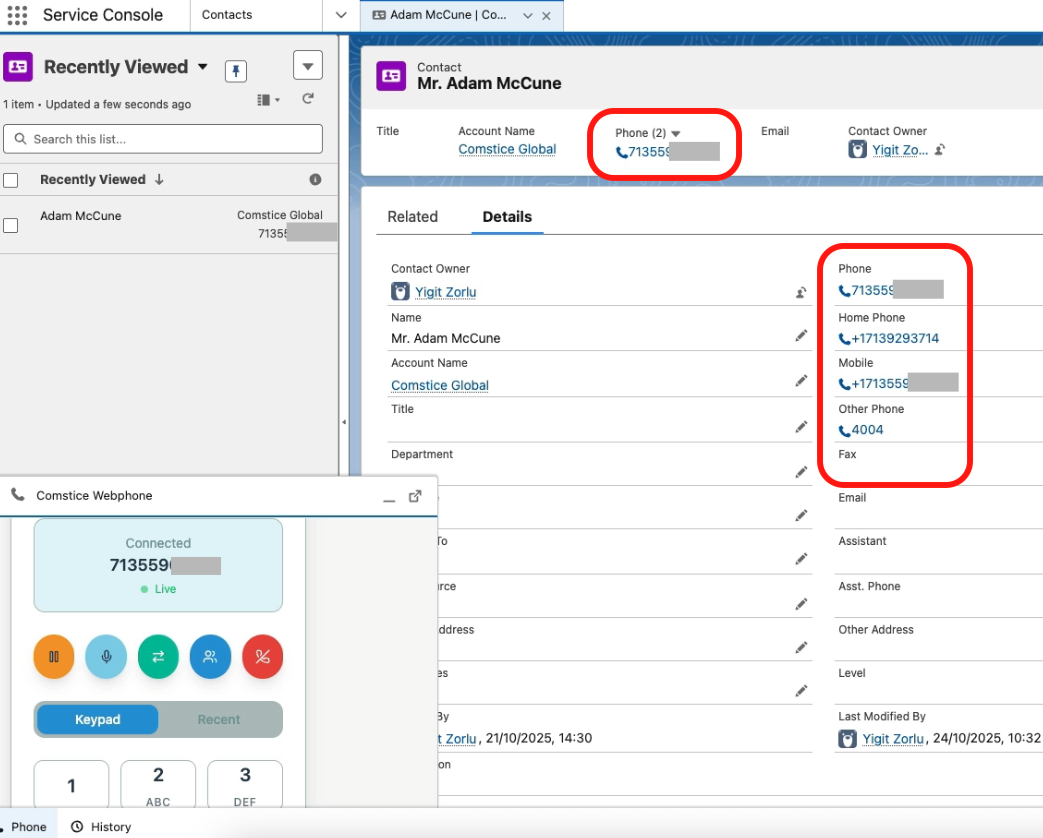
Avaya Configurations Required
On Avaya CM
- display system-parameters customer-options — verify “Computer Telephony Adjunct Links” is y, and that you have enough Adjunct Routes licensed. Adjunct Route (CM 5.1 and later) and Increased Adjunct Routes are licensed features tied to the ASAI All Features capability on CM R6 and later.
- change ip-services — enable the AESVCS service with the AES server and a password.
- add cti-link — type ADJ-IP, assign an extension. Add a CTI link using the add cti-link command with an available CTI link number, an available extension number, ADJ-IP in the Type field, and a descriptive name.
- change vector — add the adjunct routing link step plus a wait step and a fallback queue-to step.
- VDNs measured for Comstice CTI Router must have their reporting flags set appropriately if you’re also feeding CMS.
On Avaya AES
- display system-parameters customer-options — verify “Computer Telephony Adjunct Links” is y, and that you have enough Adjunct Routes licensed. Adjunct Route (CM 5.1 and later) and Increased Adjunct Routes are licensed features tied to the ASAI All Features capability on CM R6 and later.
- change ip-services — enable the AESVCS service with the AES server and a password.
- add cti-link — type ADJ-IP, assign an extension. Add a CTI link using the add cti-link command with an available CTI link number, an available extension number, ADJ-IP in the Type field, and a descriptive name.
- change vector — add the adjunct routing link step plus a wait step and a fallback queue-to step.
- VDNs measured for Comstice CTI Router must have their reporting flags set appropriately if you’re also feeding CMS.
Conclusion
Comstice can help you to get out of CT Suite without losing any of your existing functionality. Click here to schedule a demo.