

Avaya Experience Portal MRCP Configuration Guide for ASR and TTS
Comstice offers an on-premises solution to implement speech to text and text to speech features into your Avaya contact centers. Using MRCP protocol, we can implement speech to text and text to speech for many languages. Comstice also provides SOC2, ISO 27001 and HIPAA-certified Comstice Orbit Cloud, if you prefer Comstice-Hosted solution. Click here to learn more about the languages supported for ASR and TTS by Comstice.
TLDR
Comstice IVR can work with your existing Avaya Experience Portal as an MRCP resource for ASR and TTS. It can also run as a standalone solution to replace Avaya AEP. Comstice IVR solution runs on your network or your private cloud as a separate virtual server or as a Kubernetes pod. It integrates with Avaya Experience Portal 7.0.0 or higher. Comstice also offers AI Voice Assistant for AI Self Service Use Cases.
Comstice IVR Configuration
Comstice IVR settings used for integration with Avaya AAEP is under /opt/server/dryrun/comstice-ivr/config/ivr/application.yaml file. Comstice engineer can help you to configure the parameters on this file before starting your container. Port numbers are also indicated on the server settings for firewall updates.
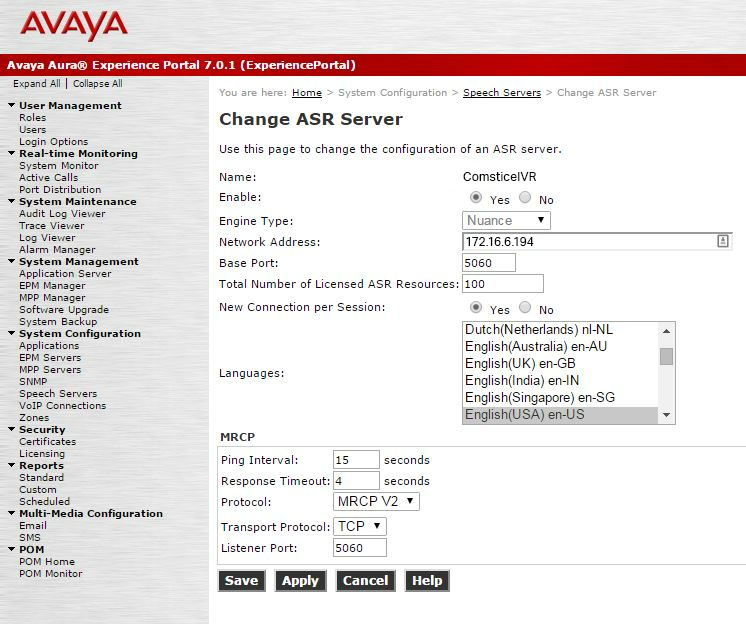
ASR Configuration for AAEP 7.0.1 and 7.0.2
Here are the steps to follow to add Comstice IVR into your AAEP Speech Servers as a ASR resource;
- Enabled: Yes
- Engine Type: Nuance
- Network Address:
- Base Port: 5060
- Total Number of Licensed ASR Resources:
- New Connection Per Session: Yes
- Languages: en-US
- Ping Interval: 15
- Response Timeout: 4
- Protocol: MRCP v2
- Transport Protocol: TCP
- Listenert Port: 5060
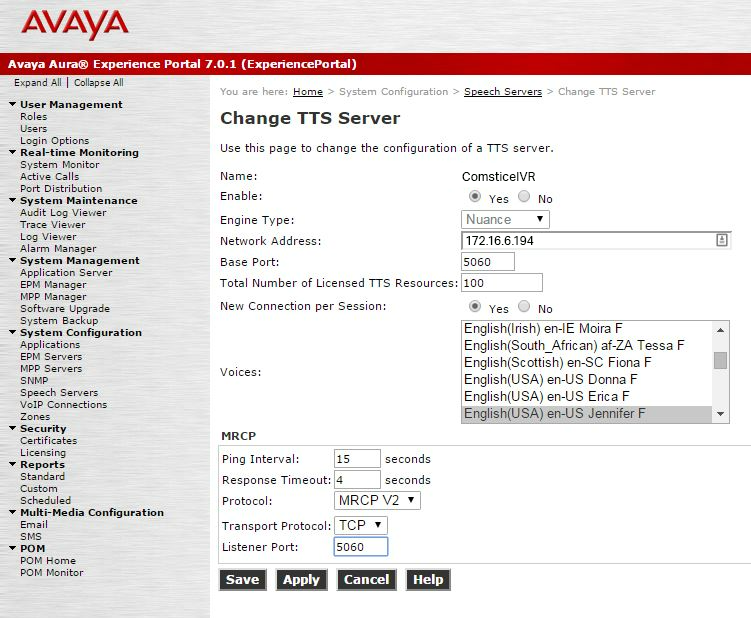
TTS Configuration for AAEP 7.0.1 and 7.0.2
Here are the steps to follow to add Comstice IVR into your AAEP Speech Servers as a TTS resource;
Avaya Experience Portal for ASR (Automatic Speech Recognition)
- Enabled: Yes
- Engine Type: Nuance
- Network Address:
- Base Port: 5060
- Total Number of Licensed TTS Resources:
- New Connection Per Session: Yes
- Languages: en-US
- Ping Interval: 15
- Response Timeout: 4
- Protocol: MRCP v2
- Transport Protocol: TCP
- Listenert Port: 5060
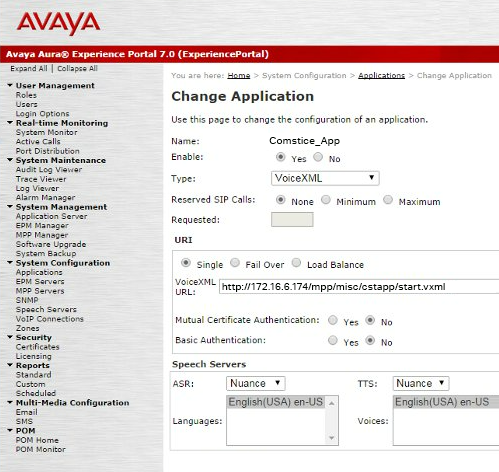
Avaya AAEP Application Configuration
- Since engine type is set to Nuance, it will be seen as "Nuance" on the Speech Servers dropdown list in the application's configuration screen.
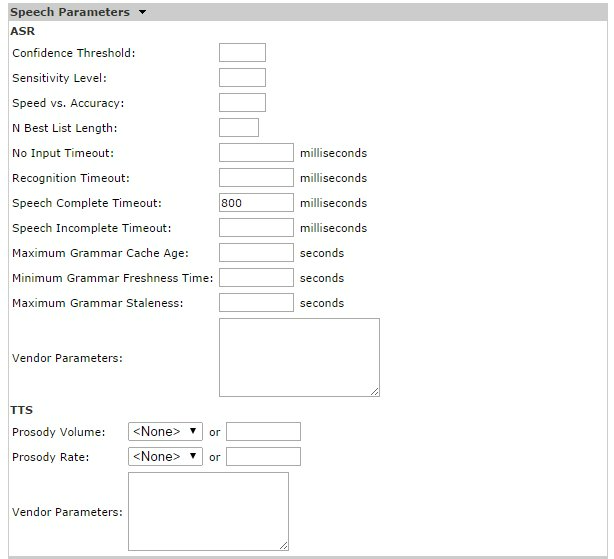
- Under Speech Parameters, Speech Complete Timeout should be set to 800ms.
The rest of the configurations should be blank.
Conclusion
Comstice IVR can run as a standalone solution and also used as a replacement for legacy ASR / TTS solutions such as Nuance and LumenVox. Comstice also offers AI Voice Assistant which helps to modernize your IVR and create AI self service use cases for various levels.